
Mastering data replication in LS Central: A complete technical guide

When it comes to managing data across different environments, few processes are as critical (or as complex) as replication. Whether you’re transferring master data, configurations, or transactional records, knowing how to set up replication correctly ensures consistency, reliability, and smooth communication between systems.
In this article, I will walk you through every option for Data Replication in LS Central, helping you choose the right approach for your specific scenario. We’ll break the topic into two key workflows; replicating master data and configuration (top-down) and replicating transactional data (bottom-up)—and explore how replication works in different setups: from one company to another in the same or different environments, and from head office to offline POS terminals.
By the end, you’ll have a clear, practical understanding of how to handle data replication efficiently and confidently across your LS Central environment.
Replication of master data and configuration (top to bottom)
HO SaaS from one company to another in DIFFERENT environments
Web Replication point-to-point is best suited for scenarios where data needs to be replicated between different environments, whether on the same tenant or across multiple tenants.
Imagine a business that has multiple production environments in SaaS due to different localizations but is still selling the same products in different regions. As is often the case, businesses typically designate a single environment for creating master data—such as retail items in this example—and then replicate that data to all other environments.
This approach helps keep data consistent across environments without the need to recreate it multiple times. Replicated data can, of course, be protected with permissions. The same principle can be applied to configuration: for instance, a company might choose to centralize its Chart of Accounts or maintain consistent Dimensions across all environments.
HO SaaS from one company to another in the SAME environment
This scenario is similar to the previous one, but instead the goal is to replicate data between companies within the same environment in HO SaaS. Remember that the Microsoft Dynamics 365 Business Central tables can contain Data Per Company or be valid across multiple companies. If a table has Data Per Company but we want to have the same data in multiple companies, we will need to define a Master Company. The Master Company is a company where you insert and maintain the master data and replicate it to the other companies.
In this scenario we recommend using the new functionality introduced in LS Central version 26: Web Replication using Company to Company.
This feature was designed to simplify the replication process by reducing the number of web calls and keeping data within the same environment, since the replication occurs between technically different tables in the same database. By eliminating reliance on web service calls, this approach makes data replication smoother, more reliable, and less resource intensive.
HO SaaS to an Offline POS
In the previous two scenarios, we dedicated our attention to master data and configuration. However, when considering using Offline POS, we need to replicate a subset of data to allow the specific POS to operate.
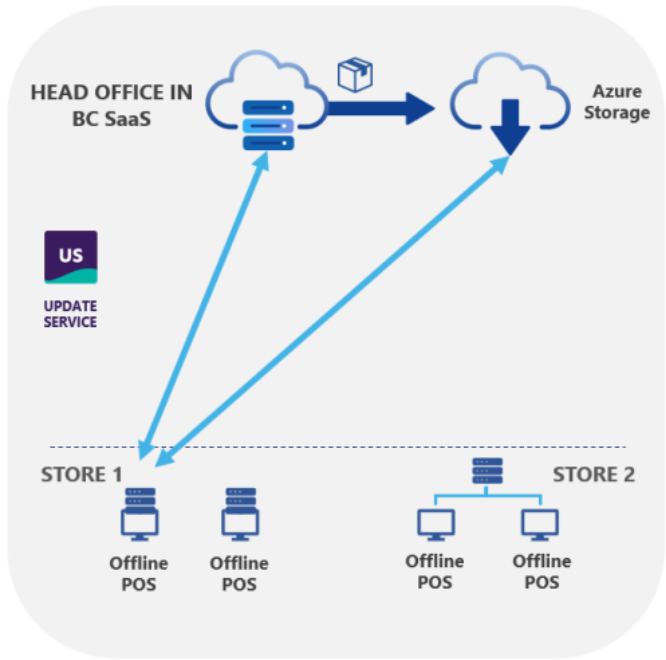
This is one of those operations that historically was done using Data Director, but now it is easier (and recommended) to use Web Replication with Azure Storage to run the offline POS.
This approach offers several clear advantages:
-
Lower costs: Customers no longer need to maintain or run the Hybrid Component Server, reducing infrastructure and operational expenses.
-
Simpler setup: Setting up offline POS is more straightforward compared to deploying HCS.
-
Easier upgrades: POS systems remain independent of HCS and Head Office SaaS upgrades, allowing you to stay current without additional dependencies or complex upgrade sequences.
-
Faster performance: our tests registered better performance when using Web Replication with Azure Storage compared to running Data Director on the Hybrid Server.
You can dive deeper into the differences between the two methods here.
Replication of transactional data (bottom to top)
Now it’s time to cover the options available when sending transactions from the Offline POS to the HO SaaS so that transactions can be posted centrally in the Head Office.
This is required only when using Offline POS architecture; the Online POS doesn’t need replication as the POS will be connected directly to SaaS using a web browser.
Offline POS to HO SaaS
For environments where POS terminals operate offline and need to send transactions to a Head Office running on SaaS, Web Replication is the recommended approach.
Unlike traditional web service calls—which often require customizations to handle additional fields—Web Replication automatically transfers all fields in the transaction tables, including those introduced by extensions, as long as they exist in both source and destination databases. This process runs through a background session triggered by the POS send service, ensuring reliable, schema-consistent replication without duplicating web services or XMLports.
To enable this process, configure the POS Functionality Profile by activating Send Transactions, Use Background Session, and Use Web Replication.
Explore the official guide here.
Scaling for large Implementations
In large deployments with numerous offline POS terminals, sending transactions exclusively via Web Replication can create performance bottlenecks at the Head Office. To address this, LS Central version 26.1 introduced a new feature: Send Transactions by Storage Queue.
This method allows POS systems to write transactions directly to a cloud storage solution (currently Azure Storage) while simultaneously sending a lightweight message to a queue (currently Azure Service Bus) that references the stored transaction. The Head Office then processes these messages asynchronously, retrieving the corresponding transactions from storage. This architecture provides several advantages:
-
Parallel Processing: Multiple POS terminals can send transactions without relying on a direct connection to the Head Office.
-
Reduced Contention: Eliminates table lock risks when multiple POS systems push data simultaneously.
-
Optimized Performance: Minimizes web service calls to the Head Office, reducing the likelihood of hitting Business Central SaaS operational limits. This approach significantly improves scalability and resilience for enterprise-level implementations. Learn more about this option here.
Will the Data Director be decommissioned or marked as obsolete?
No. The Data Director remains fully supported and continues to be a valid alternative alongside all the options described in this article. However, web replication is the recommended best practice when replicating data to or from SaaS. It simplifies the overall replication architecture, improves scalability, and delivers stronger performance in this scenario. It also makes more efficient use of SaaS resources, especially considering the operational limits for web service calls in Microsoft Dynamics 365 Business Central.
We’ve also listened to your feedback, and many of the questions we received focused on the possibility of running replications without using a Hybrid Component Server (HCS). Common motivations include reducing costs, simplifying architecture and maintenance, and minimizing the risk of bottlenecks.
In response to requests to decouple the Data Director’s functionality, we introduced several changes and options that positively impact performance. In some cases, these improvements even lead us to recommend new replication methodologies or approaches.
Looking to implement LS Retail software solutions in your business? Just contact us.

Choosing the ideal retail Point of Sale system: 5 factors to consider
