
Enhancing LS Central with Microsoft Power Platform
As businesses increasingly look for ways to digitize operations, reduce manual workloads, and improve agility, the Microsoft Power Platform has become a key enabler of low-code innovation. Comprised of Power BI, Power Apps, Power Automate, Power Virtual Agents and recently, Copilot Studio the platform provides a robust set of tools for building custom solutions, automating business processes, and enhancing data visibility without the need for extensive development resources.
Because LS Central can extend all the capabilities of Microsoft Dynamics 365 Business Central, organizations using LS Central have the opportunity to enhance and tailor the software solution to meet their unique needs. Let’s go over the different types of apps in Power Platform, their uses, and how you can connect them seamlessly with LS Central.
What is Microsoft Power Platform?
The Microsoft Power Platform is a suite of low-code tools designed to help businesses build custom applications, automate workflows, analyze data, and create virtual agents with minimal coding effort.
It includes five core components:
- Power Automate – for automating repetitive tasks and workflows
- Power BI – for data visualization and interactive reporting
- Power Pages - for creating, hosting, and administering modern external-facing business websites.
- Copilot studio – for creating your own AI agents
- Power Apps – for building custom business applications
Power Platform can be used to create apps for various platforms, such as iOS, Android, and the web, and it connects easily to hundreds of data sources, allowing users to extend other Microsoft products while reducing reliance on traditional development. Because Power Apps enables you to quickly create a usable version, it offers a “what you see is what you get” development experience. This means users can experience the actual working app very early in the process, and new features can always be added to the next version.
What apps in Microsoft Power Platform can do
1. Power Automate
Power Automate is a no-code automation platform that allows you to automate repetitive tasks and business processes across applications and services. It enables the creation of automated workflows (called flows) that can trigger actions based on specific conditions, such as sending notifications, updating data, or collecting approvals. With a low-code interface and wide integration capabilities, Power Automate helps businesses streamline operations, reduce manual effort, and improve efficiency.
2. Power BI
Power BI is a data visualization tool that enables you to connect to various data sources and create interactive reports to gain real-time insights across your entire business.
LS Central already takes advantage of Power BI’s capabilities with Analytics for LS Central, which offers out-of-the-box data models, pre-built dashboards, and analytics templates designed for retail, restaurant, and hospitality businesses. These reports make it easier to measure your KPIs, track performance, and protect your margins so you can make decisions faster.
For example, a restaurant could use the reports in Analytics for LS Central to look at sales analytics over a specific period of time, track how often items go out of stock, monitor trends in best-selling menu items, understand how often guests choose dine-in, takeaway, or delivery, which times of day are the busiest, and much more.
3. Power Pages
Power Pages is a low-code platform that allows you to create secure, data-driven websites with minimal development effort. It enables businesses to build external-facing portals where customers, partners, or vendors can view or submit data, such as booking appointments, submitting service requests, or accessing account information. Power Pages integrates seamlessly with Microsoft Dataverse and other Dynamics 365 apps, making it easy to surface business data through customized web experiences while maintaining security and compliance.
4. Copilot Studio
Copilot Studio offers a powerful, low-code platform that transforms your ideas into AI-powered agents capable of understanding natural language, automating tasks, and interacting with users across multiple platforms.
At its core, Copilot Studio is like a creative canvas for building conversational AI. You don’t need to be a developer to use it. With intuitive drag-and-drop tools and natural language prompts, you can design agents that answer questions, retrieve data, and even trigger workflows — whether it’s helping employees reset passwords, guiding customers through a product catalog, or automating HR onboarding.
These agents aren’t confined to one place. You can deploy them across Microsoft Teams, websites, mobile apps, and even integrate them into Microsoft 365 Copilot experiences. And because it’s built on Microsoft’s Power Platform, it connects seamlessly with your existing data sources, like SharePoint, Dataverse, or external APIs, while maintaining enterprise-grade security and governance.
In short, Copilot Studio is where business meets AI creativity; a place where you can bring intelligent digital assistants to life, tailored to your organization’s unique needs.
5. Power Apps
Power Apps is a low-code application development environment. It allows you to create apps that solve specific problems, like tracking inventory, managing employee onboarding, or streamlining customer service. You don’t need to write complex code; instead, you use a visual interface to drag and drop components, connect to data sources, and define logic using Excel-like formulas.
But Power Apps isn’t just about simplicity, it’s about powerful integration. It connects seamlessly with Microsoft 365, Dynamics 365, Azure, and hundreds of other services through built-in connectors. You can pull data from SharePoint, SQL Server, Salesforce, or even custom APIs, and build apps that work across web, mobile, and tablets.
Power Apps in action with LS Central
Housekeeping solution
In many hotels, housekeeping teams still rely on printed schedules or desktop systems to manage room cleaning and status updates. This slows down communication between staff and the front desk, especially when changes happen throughout the day. While LS Central for hotels includes robust housekeeping functionality in the back office, it was not easily accessible on the go, limiting flexibility for housekeeping staff working across multiple floors or properties.
After receiving feedback from partners asking for mobile access to housekeeping operations, we developed a Power App that connects LS Central for hotels with Microsoft Power Apps.
To make this possible, our team introduced an API extension enabling external applications to interact directly with LS Central. A Custom Connector was then created to establish a secure connection between the Power App and the API, working in both SaaS and on-premises environments (the latter through a Gateway).
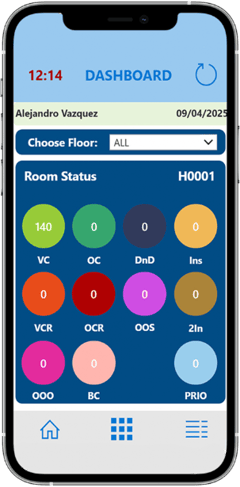
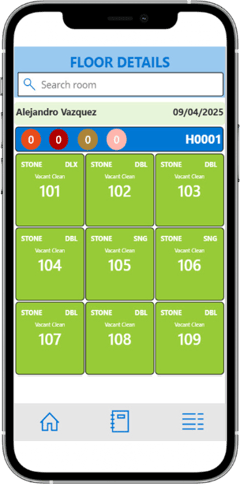
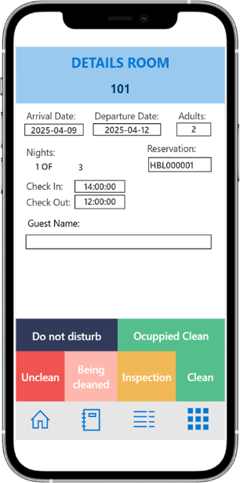
The Housekeeping app provides hotel staff with a fully mobile, real-time view of housekeeping data. Team members can now update room status, track cleaning progress, and manage tasks directly from their devices, which reduces delays and improves coordination between housekeeping and front desk operations.
Ready to unlock the full potential of Microsoft Power Platform with your LS Central system?
Microsoft Power Platform empowers your business to transform the way you operate by enabling greater efficiency, enhanced data-driven decision-making, and improved interaction with customers and employees alike. It provides a flexible, scalable framework that adapts to your unique needs, allowing you to innovate rapidly without the constraints of traditional development cycles.
Want to know more about how to make the most out of Power Platform with LS Central? Our team of highly skilled consultants are ready to guide you. Just talk to our experts!

Implementing your new cloud-based ERP doesn’t have to be a nightmare
